GA PDF Editor
GA PDF Editor is an offline-first PDF workstation that runs in the browser.
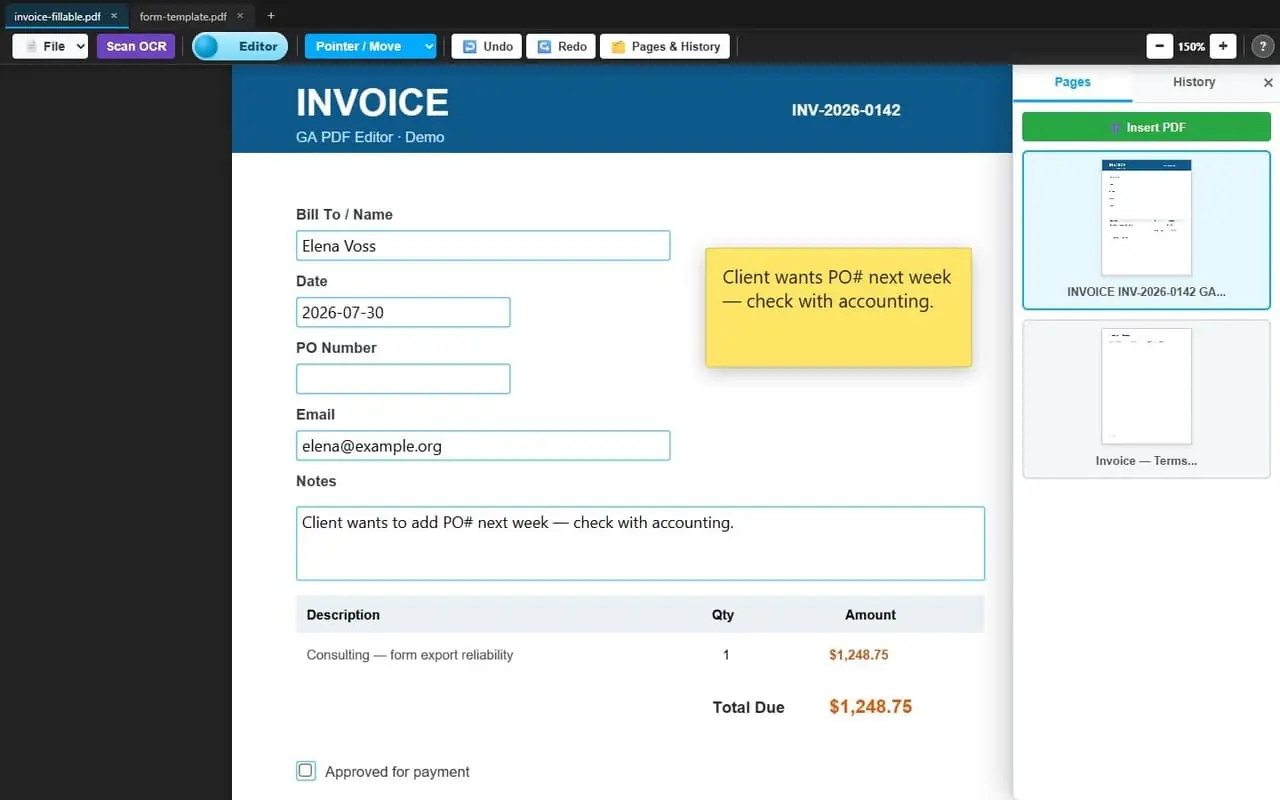
Annotate. Fill forms. Design AcroForms. Combine PDFs. Reorder pages. Local OCR. Project save. Honest PDF export.
Static files. No “please upload your soul.” Your document bytes stay on the machine.
Built for people who live in PDFs and would rather not rent a cloud seat to highlight a sticky note.
Grab tea. There will be AcroForms. There will be feelings.
Live demo
Want to poke the real app before you adopt a zip into your life?
Hosted build, same client-side workstation — open a tab, drag a PDF, make a mess.
Hosted ≠ upload-to-cloud. The box only serves static files.
Annotate, design forms, combine pages, export — all of it runs in your browser. Nothing useful happens server-side; your document bytes never leave the tab.
First visit may pull WASM / vendor libs over the wire. After that it’s still desktop-app cosplay in a browser, not a SaaS vault with your PDF as rent.
Prefer USB-stick immortality and the optional local shell? Skip ahead to How To… get it below.
What can it do?
Documents & pages
- Open / append PDFs and
.gapdfprojects (multi-select OK)- Combine PDFs for free — merge many files into one document, or open each as its own tab
- Insert PDF mid-stack from the Pages panel
- Reorder pages with drag-and-drop on thumbnails (undoable!)
- Delete pages · double-click a thumb label to rename
- Multi-document tabs — each keeps its own zoom, overlays, and history
- Session restore after refresh (handles + PDF bytes in IndexedDB)
- Drag-and-drop files onto the window to open or append
Annotate & layout
- Add text overlays (sticky-note energy welcome)
- Edit / stamp rich text blocks with fill & border
- Shapes — rectangle; line / quick redaction bar
- Tables / grids · insert images · snip & move regions
- Type-a-name signatures with cursive styles
- Drag, resize, rotate, snap guides, multi-select marquee
Fillable forms (the spicy part)
- Editor mode — fill existing native AcroForm fields
- Forms mode — design / move / multi-select field shells
- Field types: text, checkbox, radio, dropdown, signature
- Auto-import natives into designer twins when you open a fillable PDF
- Export re-embeds real widgets at designer geometry — still fillable later in Adobe etc.
- Not “flatten to image and hope nobody notices”
OCR · print · protect
- Scan OCR offline (Tesseract, English) — active tab only
- Works on
file://after one-time setup (embeds, not CDN babysitting forever)- Print flattened page images
- Open password-protected PDFs
- Optional password-protect on export (QPDF WASM) without murdering fillable fields
Save & ship
- Save Project (
.gapdf) — real PDF + gzip JSON trailer (overlays, form state)- Save PDF — flatten annotations; keep fields fillable; quality presets (draft → ultra)
- Undo / redo via an instruction-tape history (not haunted closures clutching the DOM)
- Offline-first packaging: tiny slim zip + double-click Setup.bat
- Optional local shell (
GA-PDF-Editor-SVC.exe) for a sticky localhost origin / PWA — no admin
Free as in we don’t meter merges. Combine, reorder, delete, annotate, form-design, OCR, encrypt — all client-side.
The world is your oyster… or clam… or whichever bivalve you’re comfortable shipping on a USB stick.
Pretty pictures (real ones!)

Flip the workspace to Forms and fields grow handles you can shove around.
Export listens to these boxes — not vibes from 2019.

Ship ~0.3 MB of hope. Double-click Setup.bat. Multi-CDN if one mirror is napping.
Then keep WASM forever offline. Pocket localhost server that doesn’t demand admin like a medieval toll bridge.
How To… get it
Download — name your price!
- Enter 0 → immediate free download (tiny tips vs fees is a sad trombone).
- Enter $1+ → PayPal, then the thank-you download. Suggested $10. Anything helps. ♥
- You still need to run Setup.bat once after unzip (network, one time).
Unzip anywhere
- Drop the package wherever you want. USB stick. Network share. Desk drawer energy.
- No installer. No Node on every machine. No “please sign in with your enterprise identity.”
Double-click Setup.bat
- One-time setup downloads vendors + fonts (network required once).
- Starts
GA-PDF-Editor-SVC.exeso Open GA PDF Editor.url gets written with the live port.- Optional start-on-boot (user Startup / HKCU Run — still no admin cosplay).
- Advanced humans can still run
tools\setup.ps1if they enjoy typing.
Open the .url once
- Open Open GA PDF Editor.url (or
app\index.htmlif you’re living dangerously on file://).- Optional: browser Install app / PWA so it feels like a real desktop citizen.
- Sticky port — the service won’t silently hop ports and orphan your install. Be boring. Be loved.
Further Issues?
- Packaging notes live with the zip (
SETUP-FIRST.txt,tools\SETUP.md).- If something’s on fire, reach out — same house, different fire: [email protected]
A few boss fights (abridged)
I did not plan a saga. I planned “tabs would be nice.”
Then form export ate a week of my life and I started naming cache-bust slugs like war medals.
Multi-tab event isolation
- Tools only worked on tab one. Listeners bound once to the original
#viewerlike a medieval peasant.- Tab 2: beautiful. Also: mute.
- Fix: bind high, resolve the live pane. Preferably before demo day.
Create ≠ “a human can click this”
- Console poem of the year:
wrote widgets=0 failed=N form.getFields()=N- Four fields on the AcroForm object. Zero page widgets.
- Lesson: count widgets on pages. Fresh form after strip. Never pass NaN geometry to a library that believes you.
setTimeout(100) is not a strategy
- It’s a coin flip. Hard-refresh bugs are usually ordering bugs.
- Await render. Schedule repair passes. Sleep is not a dependency.
Rites of passage (bonus round)
- Spent twenty minutes hunting a missing semicolon that was actually a trailing comma wearing a trench coat.
- Declared victory, then the browser served 2019 from cache. Hard refresh fixed it harder.
?v=is a lifestyle.pointer-events: noneon the thing you then try to drag — gaslighting yourself with CSS.- Commit messages:
fix→fix 2→please→ actual human words after shame.- “Works on my machine” where “my machine” means one tab, one PDF, and a full moon.
Bottom line
You can shove a static, offline-capable web app surprisingly far toward “real PDF software” — if you respect PDF structure, treat the DOM as an editor canvas with an honest export step, and treat packaging like part of the product.
The hard parts were never “draw a box.” They were truth, timing, and transport.
Thanks for reading. Go make a fillable form. Or a sticky note. Or both. ♥
— fjlj / Give Academy
Comments
Comments will be back soon. Disqus is overbloated, tracks too much and shows annoying ads.
Ads That... If I wanted to have a few ads of my own, it would be stealing from me.